Connect
Connect Starglass where you already work.
Work in the Starglass app, or bring three read-only tools into the AI client you already use: list the sources, search official public records, and fetch a passage with its citation receipt. Your AI client does the reasoning.
- By requestThe Starglass appPlan, run and keep research in a Living Case with your team.
- Tested 2 Oct 2026Claude Code pluginInstall from the public marketplace and sign in once.
- Tested 2 Oct 2026ChatGPT custom connectorAdd the Starglass endpoint as a custom MCP connection.
- Workflow onlyAgent skillInstall the research workflow into your coding agent with one command.
- Not yet testedAny MCP clientPoint a client that supports OAuth at the endpoint.
Before you start
Every path starts with an access request.
Starglass is live, and access is by request: a person sets up each account. Installing a plugin, connector or skill does not grant access on its own; sign-in works once your account is set up. Free for 30 days, then $49 per user per month.
01 · The Starglass app
Research in the workbench.
Bring a question, a source pack or a dataset. Quick Answer returns a cited response. Deep Research pauses on an editable Case Plan, then returns a Living Case with the sources attached. Data Workbench keeps raw rows private.
Sign in with your Starglass account.
aculeus.ai/app opens the sign-in page.
Ask your first question.
Choose Quick Answer for a cited response now, or Deep Research to review a plan first.
02 · Claude Code plugin · Tested 2 Oct 2026
Install the plugin in Claude Code.
Add the marketplace, install and enable the plugin.
claude plugin marketplace add Jeremyaculeus/starglass-plugin claude plugin install starglass-research@starglass --scope user claude plugin enable starglass-research@starglass --scope userStart a fresh session and sign in.
claude mcp login plugin:starglass-research:starglass-researchSign in with your Starglass account and approve read-only access (
plugin-research:read). No API key is needed.Ask your first question.
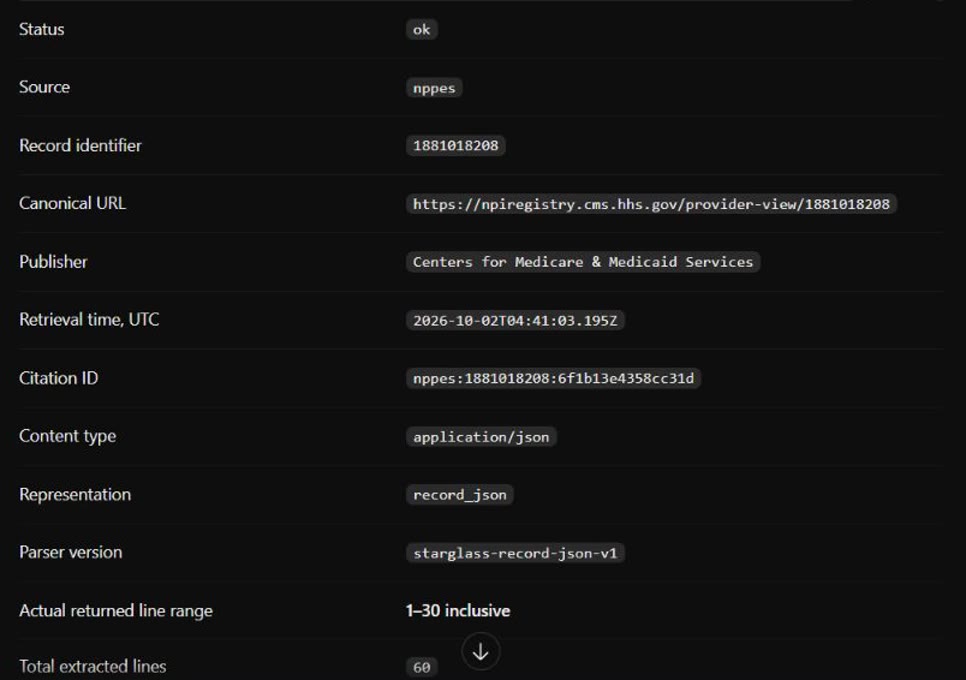
Use Starglass to list its sources and limits. Then search NPPES for Mayo Clinic organizations with one result, and fetch that record's lines 1 to 30 with its citation receipt.
If you also added the same endpoint by hand, that entry takes precedence over the plugin. Keep one installation.
03 · ChatGPT custom connector · Tested 2 Oct 2026
Add Starglass as a ChatGPT connector.
Check that your plan allows custom connectors.
Your ChatGPT plan and workspace decide whether custom MCP connections are available. A personal ChatGPT Pro account completed sign-in, search and fetch on 2 Oct 2026.
Create a custom connector with this endpoint and OAuth.
https://aculeus.ai/api/mcpSign in and approve read-only access.
Use your Starglass account. The connection asks only for read-only access.
Ask your first question.
Use Starglass to list its sources and limits. Then search NPPES for Mayo Clinic organizations with one result, and fetch that record's lines 1 to 30 with its citation receipt.
04 · Agent skill · Workflow only
Add the research workflow with npx.
Install the starglass-research skill.
npx skills add Jeremyaculeus/starglass-plugin --skill starglass-researchThe open
skillsinstaller adds the workflow for the coding agents it detects, in your project or, with-g, for your user.Connect the server too.
The skill teaches your agent the workflow: pick one source, search, fetch only a returned record, and report its receipt. It does not connect Starglass. Pair it with the plugin or a connector above.
05 · Any MCP client · Not yet tested
Connect another MCP client.
Clients beyond the two above have not been tested. Your client needs remote MCP over HTTP with OAuth sign-in. Starglass does not use dynamic client registration, so the client must identify itself with a client metadata document.
- Server URL
https://aculeus.ai/api/mcp- Transport
- Streamable HTTP
- Sign-in
- OAuth 2.0 with PKCE (S256). Your client finds the authorization server in the endpoint's protected-resource metadata.
- Scope
plugin-research:read; clients may also requestoffline_access- Tools
sources_list,source_search,source_fetch. All read-only.
Check it worked
A fetch comes back with its receipt.
A successful fetch names the canonical URL, the publisher, the retrieval time, the returned line range and the integrity hashes. An empty search does not prove a record is absent, and a receipt identifies what was returned; it does not certify the source's claims.
Manage access
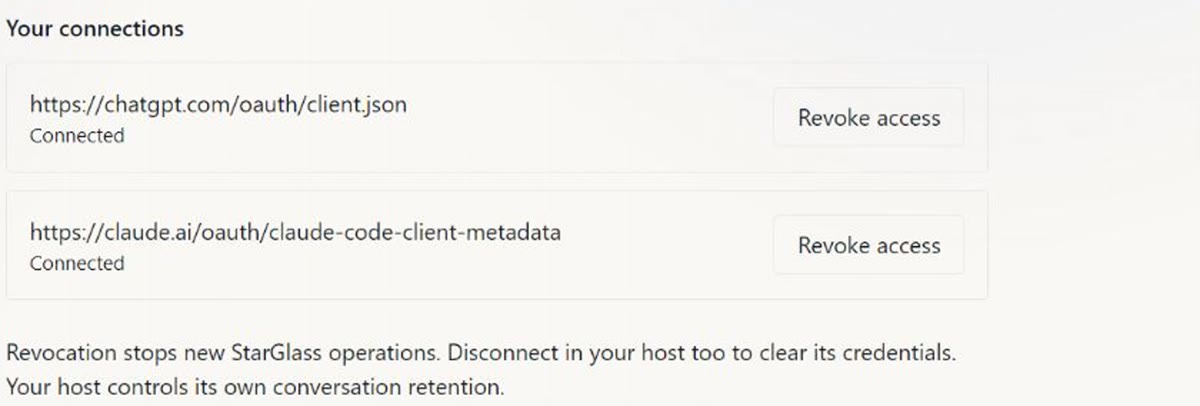
See and revoke your connections.
Research connections lists every client connected to your account. Revoking one blocks its next Starglass request; disconnect it in your client too to clear the credentials it stores. Your AI client may ask you to sign in again; connections don't renew on their own yet.
Plugin guide: sources, allowances and data · The walkthrough and plugin (opens in a new tab)